
mybatis学习笔记(day4)
mybatis学习(day4)
输入映射
通过parameterType指定输入参数的类型,类型可以是
- 简单类型
- hashmap
- pojo的包装类型
昨天已经解释过parameterType是什么了
例如:
[code]
[/code]
中的 parameterType 是来指定字段类型的
传递pojo的包装对象
- 定义包装类型pojo
[code] package com.iot.mybatis.po;public class UserQueryVo { //在这里包装所需要的查询条件 //用户查询条件 private UserCustom userCustom; public UserCustom getUserCustom() { return userCustom; } public void setUserCustom(UserCustom userCustom) { this.userCustom = userCustom; } //可以包装其它的查询条件,订单、商品 //….}
[/code]
其中,UserCustom类继承User
[code]
public class UserCustom extends User{}
[/code]
- mapper.xml
在UserMapper.xml中定义用户信息综合查询(查询条件复杂,通过高级查询进行复杂关联查询)。
[code]
[/code]
注意不要将#{userCustom.sex}中的userCustom写成UserCustom,前者指属性名(由于使用IDE提示自动补全,所以只是把类型名首字母小写了),后者指类型名,这里是UserQueryVo类中的userCustom属性,是属性名 。写错会报如下异常:
[code]
org.apache.ibatis.exceptions.PersistenceException: ### Error querying database. Cause: org.apache.ibatis.reflection.ReflectionException: There is no getter for property named ‘UserCustom’ in ‘class com.iot.mybatis.po.UserQueryVo’### Cause: org.apache.ibatis.reflection.ReflectionException: There is no getter for property named ‘UserCustom’ in ‘class com.iot.mybatis.po.UserQueryVo’
[/code]
- mapper.java
[code]
//用户信息综合查询public List
[/code]
- 测试代码
[code]
//用户信息的综合 查询 @Test public void testFindUserList() throws Exception { SqlSession sqlSession = sqlSessionFactory.openSession(); //创建UserMapper对象,mybatis自动生成mapper代理对象 UserMapper userMapper = sqlSession.getMapper(UserMapper.class); //创建包装对象,设置查询条件 UserQueryVo userQueryVo = new UserQueryVo(); UserCustom userCustom = new UserCustom(); //由于这里使用动态sql,如果不设置某个值,条件不会拼接在sql中 userCustom.setSex(“1”); userCustom.setUsername(“张三”); userQueryVo.setUserCustom(userCustom); //调用userMapper的方法 List
[/code]
补充
传递多个参数:
当 Dao 接口方法多个参数,需要通过名称使用参数。在方法形参前面加入@Param(“自定义参数名”),mapper 文件使用#{自定义参数名}。
例如定义 List selectStudent( @Param(“personName”) String name ) { … }
mapper 文件 select * from student where name = #{ personName}
接口方法:
@Param注释写在mapper接口里
[code]
/** * 多个参数:命名参数,在形参定义的前面加入@Param(“自定义参数名称”) */ public List
[/code]
mapper 文件:
[code]
[/code]
测试方法:
[code]
@Test public void testSelectMultiParam() { SqlSession sqlSession = MybatisUtils.getSqlSession(); StudentDao dao = sqlSession.getMapper(StudentDao.class); List
[/code]

多个参数-使用对象
使用 java 对象传递参数, java 的属性值就是 sql 需要的参数值。 每一个属性就是一个参数。
语法格式:
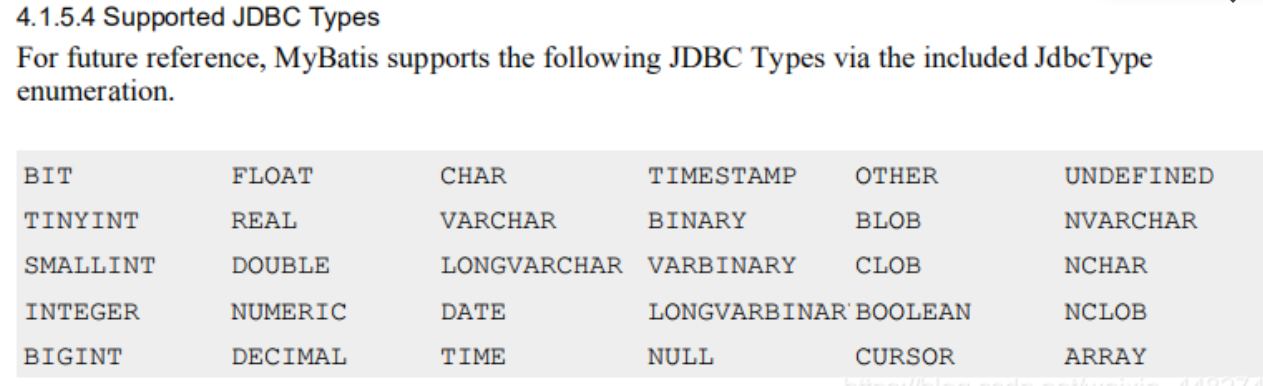
#{ property,javaType=java 中数据类型名,jdbcType=数据类型名称 }
javaType, jdbcType 的类型 MyBatis 可以检测出来,一般不需要设置。
常用格式 #{ property }
注:部分的我还没搞懂,等晚上再发